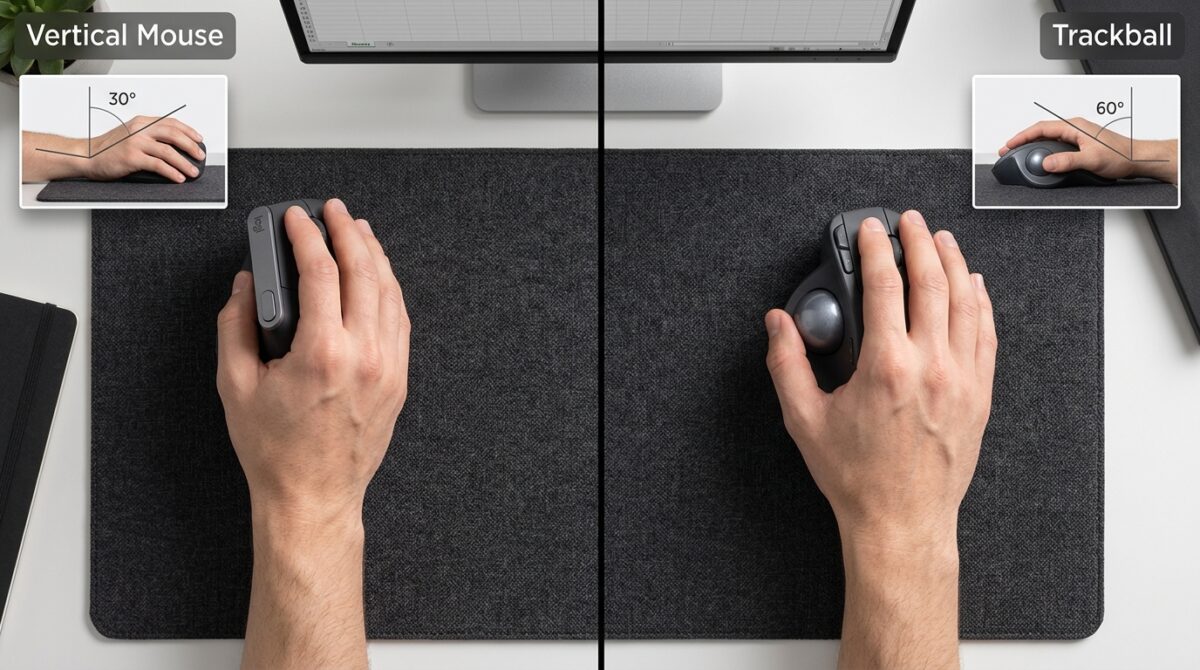
Vertical Mouse vs Trackball: Comparing Wrist Pronation Angles for Repetitive Spreadsheet Data Entry
Professionals who spend a significant amount of time working with spreadsheets often make the mistake of concentrating on software efficiency, keyboard shortcuts, and workflow optimization. However, they fail to take into account ergonomic input devices, which are among the most significant elements that influence long-term productivity. Every single day, millions of minute cursor movements, clicks, and navigational activities are required for the repetitive process of entering data into a spreadsheet. It is possible that the wrist, forearm, and hand may experience severe strain as a result of these repeated actions over time. Vertical mice and trackballs are two popular alternatives to regular mice. Both of these mice are meant to lessen the amount of physical stress experienced by the user when using a computer for a long period of time. Despite the fact that every device takes a distinct approach to ergonomics, one of the most important factors to take into account is wrist pronation, which refers to the inward rotation of the forearm that happens while using a traditional mouse. Users may benefit from gaining an understanding of how vertical mice and trackballs influence pronation angles, which can assist them in making more educated choices on how to reduce fatigue and preserve comfort when working intensively on spreadsheets.
A Comprehensive Understanding of Ergonomic Stress and Wrist Pronation
During the process of wrist pronation, the forearm rotates in such a way that the palm is facing downward toward the surface of the desk. Throughout the course of a regular workday, this position is frequently required for traditional computer mouse. Maintaining a completely pronated posture for a significant amount of time may cause excessive muscular tension in the forearm, in addition to placing extra stress on the tendons and joints. This is despite the fact that the action seems to be normal. Spreadsheet operations that are repetitive often include constant cursor movement between cells, formulae, menus, and data fields. This posture is greatly prolonged for a longer period of time. The extended use of pronation may, over time, be a factor in the development of pain, stiffness, and decreased endurance. The goal of ergonomic input devices is to alleviate these stressors by promoting more neutral wrist and forearm postures that are more in line with the normal resting posture of the body.
Using Vertical Mice to Reduce Pronation Involved
Rather of having the palm of the hand facing down, vertical mice are meant to have the hand positioned in a manner that is similar to a handshake. These devices lessen the amount of forearm pronation that is necessary during operation by performing the rotation of the hand in an outward direction. The majority of vertical mice position their wrists at an angle between the neutral and partly rotated positions. This, in comparison to conventional mice, results in a considerable reduction in the amount of muscle stress. Users are able to move the cursor while at the same time retaining a more natural alignment of the wrist, elbow, and forearm while they are entering data into a spreadsheet. It is possible that this design may lessen tiredness after lengthy periods of labor since it helps distribute the physical strain more equally across the arm. When it comes to persons who have pain as a result of extended mouse use, the decrease in pronation is often one of the most visible effects.
The Trackball Method From an Ergonomic Perspective
When it comes to controlling the pointer, trackballs use a completely different approach. Utilizing their fingers, thumbs, or palms, users are able to handle a fixed ball rather than moving the complete gadget across the surface. Because the gadget does not move from its position, there is a considerable reduction in the amount of arm movement. Trackballs may enable users to keep their wrists in a somewhat neutral posture throughout the day, however this is contingent upon the precise design of the trackball. While some models are inclined to reduce the amount of pronation that occurs, others are more similar to conventional mice and provide less of an ergonomic advantage by virtue of this attribute. The most significant benefit is the reduction of massive arm movements that are repeated. When it comes to navigating spreadsheets and doing repetitive cursor operations, trackballs may reduce the total physical burden by restricting movement to smaller finger and thumb motions.
Taking a Look at Different Pronation Angles in Practice
Vertical mice, in general, provide the most direct decrease when it comes to the examination of wrist pronation especially. Repositioning the hand and forearm into a more neutral alignment is the objective of these devices in their entirety. Compared to conventional mouse, the majority of users report an instant reduction in the amount of forearm rotation they feel. Trackballs, on the other hand, might be somewhat different from one design to another. While there are some ergonomic trackballs that keep the wrist in a pretty neutral posture, there are others that still need rather considerable pronation. One consequence of this is that the degree of progress varies from model to model. Users whose major goal is limiting pronation angles may find that vertical mice provide a clearer and more predictable ergonomic benefit than horizontal mice. There is a possibility that trackballs may minimize total movement, but there is no certainty that they will ensure significant reductions in forearm rotation.
Movement Patterns While Working with Spreadsheets at Work
When compared to graphic design, gaming, or ordinary online surfing, the motion of the pointer in spreadsheet data entering is distinct from other activities. Through the use of brief, repeating gestures, users regularly navigate between neighboring cells, toolbars, tabs, and formula fields. In addition to improving hand posture, vertical mice perform these activities in a manner that is comparable to that of standard mice. Due to the fact that the movement of the pointer is consistent, the learning curve is often manageable. By moving control to finger-driven ball manipulation, trackballs provide a more substantial modification to the movement pattern. Despite the fact that some users rapidly adjust to the decreased arm motion and welcome it, others first feel that precise navigation is more difficult to accomplish. When it comes to spreadsheet operations that are repetitive, the efficiency of either device is often dependent on how effectively the user is able to adapt to the movement mechanics of the device.
Exhaustion and endurance for extended periods of time
An essential quality for professionals who spend their whole workdays inputting, evaluating, and analyzing spreadsheet data is the ability to maintain their endurance. The use of vertical mice helps to alleviate strain by enhancing arm alignment, which may be beneficial for maintaining comfort throughout extended periods. Several users have reported experiencing reduced stress in their wrists and forearms after switching from regular mouse to the new mice. By reducing the amount of physical activity that is required, trackballs have the potential to alleviate fatigue in the upper arms and shoulders. It is possible, however, that some users may feel localized finger or thumb tiredness depending on the design of the trackball and the intensity of their use. Due to the fact that the two devices have different ways of distributing the burden, personal preference and individual biomechanics are key factors to take into account when considering long-term comfort and endurance characteristics.
There are differences in the learning curve and adaptation.
It is common for there to be a time of adjustment required during the process of switching to an ergonomic input device. Learning to utilize vertical mice often involves a reasonably short learning curve due to the fact that cursor movement is largely unaffected by vertical mice. After a few days of consistent usage, the majority of consumers report feeling more at ease. Trackballs, in general, call for a more prolonged adaption process due to the fact that the manner of controlling the cursor is fundamentally different from the conventional mouse operating methodology. It is possible that users may experience a temporary decrease in initial productivity as they establish new movement patterns and abilities in precise control. It is possible for the adaption time to have an impact on the device selection process for spreadsheet professionals who are working under tight deadlines. Vertical mice are often more enticing to users who are looking for rapid ergonomic advantages because of the speedier transition that is linked with that kind of mouse.
Determining Which Method Is the Most Appropriate for Repeated Data Entry
In order to choose the perfect equipment, it is necessary to consider the unique ergonomic issues that the user is experiencing. The vertical mouse is often the most beneficial option for those who are mainly concerned with wrist pronation and forearm pain. This is because the vertical mouse immediately addresses hand placement. The use of trackballs may be more beneficial for those who are looking to lessen the total amount of arm movement and shoulder fatigue. Both of these methods have the potential to be useful since processes that include a significant amount of spreadsheets usually entail a mix of precise cursor positioning and repeated navigation. When determining which solution is most suitable for the needs of everyday work, it is helpful to take into consideration a number of aspects, including the amount of space available at the desk, the individual’s preferred movement patterns, and any existing pain patterns.
Maximizing Productivity While Maintaining Ergonomics
When it comes to the repeated data entering process in spreadsheets, vertical mice and trackballs both provide significant gains over regular mice. However, these improvements are achieved via distinct ergonomic methodologies. Users who are suffering tension in their forearms and wrists may find that vertical mice are especially useful since they are able to reduce wrist pronation by putting the hand in a more natural attitude. Despite the fact that their influence on pronation varies depending on the design, trackballs significantly lessen the total movement demands and may ease tension on bigger muscle groups. Vertical mice, in general, provide a more significant ergonomic benefit to users who are especially concerned with reducing the amount of wrist pronation angles. But the greatest answer for the long term is often the one that combines comfort, productivity, and regular daily usage. This makes it possible for professionals to work productively while also lowering the amount of cumulative physical stress they experience over time.